Alignment: AI Can Write the Code. Can It Remember Why?
A practical experiment in project memory, human judgment, and keeping AI-assisted development under control.
I caught myself considering another rule to stop an AI project manager from forgetting the rules it already had. That was a warning sign. I'd set out to develop software with AI, but I was starting to spend an absurd amount of time supervising the workflow around it.
The tools were useful. ChatGPT helped me reason through requirements and review code; GitHub Copilot could implement an agreed change quickly. The trouble was continuity. Decisions lived in long conversations, a fresh session often meant repeating yesterday's explanations, and every attempt to prevent mistakes seemed to invite another layer of process.
Alignment is my attempt to solve that problem: a lightweight, human-guided approach in which project knowledge survives individual AI conversations, responsibilities are explicit, and verification leaves a trace. It's a working experiment, not a claim that I've discovered the one true way to build software.
The project needs a memory, not another conversation
Andrej Karpathy's idea of an LLM-maintained wiki helped sharpen my thinking. Rather than force an AI to reconstruct context from scattered material every time, keep useful knowledge in structured, persistent Markdown. For a software project, the obvious home for that knowledge is the Git repository.
The starting point is Karpathy's LLM Wiki concept. Alignment applies a related idea to requirements, architectural constraints, decisions, and evidence of what was actually built.
A repository can tell a new coding session what the application must do, what it must not do, and which choices have already been approved. The documentation travels with the source code and changes under version control. That beats relying on an AI assistant to remember a meeting that took place in a different chat.
Of course, a Markdown file isn't magic. An assistant has to read the right document and respect it. The knowledge also has to stay current. That's why Alignment couples persistent memory with defined roles and human review, rather than treating documentation alone as the solution.
How Alignment works
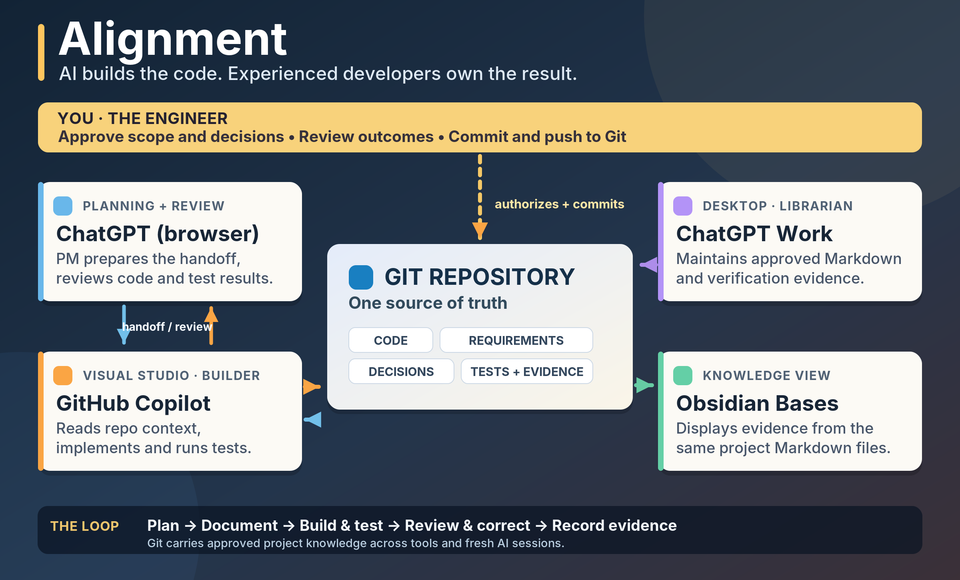
The developer owns the requirements, architecture, decisions, and final approval. ChatGPT in the browser acts as project manager and technical reviewer, using standing instructions to help keep planning, scope, and review consistent. ChatGPT Work Desktop has a different job: as Librarian, it maintains approved project Markdown and later records meaningful verification evidence. I keep those roles separate deliberately.
GitHub Copilot in Visual Studio is the implementer. Its repository instructions point it to the project documents instead of asking me to paste the same specification into each new conversation. Git holds the code and project knowledge together. Obsidian opens that same documentation folder, so I can inspect decisions and see verification records in a Bases view without maintaining a second copy.
The sequence is straightforward. We agree on a requirement; the Librarian records the approved version; I review and commit it. Copilot reads that repository context before implementation, then writes code and runs tests. The result comes back for technical review. If we find a problem, we correct it and review again. I control the commits, and the Librarian records the evidence worth keeping.
That's a feedback loop, not a ceremony in which six tools take turns producing paperwork. If a step doesn't improve understanding, control, or verification, it has no automatic right to stay.
A small test of the idea
For a first exercise, I chose a tiny .NET 10 application that tracks a laptop being checked out, reported returned, and physically received by staff. The rule that mattered was simple: a return report must not make the laptop available for somebody else. Only a separate receipt confirmation can do that.
We approved the requirement and design in the repository. In a fresh Copilot Ask conversation, Copilot found and correctly described those rules without my pasting them in. Its Agent mode then implemented three HTTP endpoints, an in-memory state machine, and tests. The first six tests passed.
Reviewing the actual C# exposed a possible concurrency defect: the shared laptop's state check and update weren't synchronized. Copilot added a lock around the transition, the solution built, and eight tests passed. We didn't reproduce the race with competing requests, and the two new tests covered repeated invalid operations rather than concurrency. I don't want to claim more than we observed.
The useful result was broader than the fix. The requirement survived a fresh AI session; implementation was checked against it; a reviewer found a risk the initial tests missed; and the outcome was recorded in a versioned Markdown evidence note, visible in Obsidian. That's what the methodology is intended to make routine.
Two repositories you can inspect
The public Alignment Toolkit contains the reusable .NET 10 starter template, Copilot instructions, and a starter set of Markdown knowledge files. It creates a project with places for requirements, architecture, decisions, and meaningful change records. The generated documents are placeholders until a developer reviews and approves project-specific content.
The Alignment Demo is the worked example: actual code, eight automated tests, the approved laptop-return requirements, and the verification record. If you want to understand the method before trying it, start there.
To try the Toolkit on Windows with the .NET 10 SDK installed, the essential commands are:
git clone https://github.com/IrishChieftain/alignment-toolkit.git
cd alignment-toolkit
dotnet new install .\templates\human-guided-web
dotnet new alignment-web -n MyAlignmentApp -o .\sandbox\MyAlignmentApp
dotnet build .\sandbox\MyAlignmentApp\MyAlignmentApp.slnx
The Toolkit README explains the setup; the generated application's docs explain where to put approved requirements. Treat your new application as its own Git repository. Before asking Copilot to build anything, start an Ask conversation and have it tell you what the approved requirements and exclusions are. If it can't, don't proceed to Agent mode yet.
The process has to earn its keep
I don't yet know whether Alignment reduces token use, cuts defects, or saves time compared with a simpler workflow. I've demonstrated that it can preserve requirements across AI sessions and support a useful review-and-evidence cycle in one small exercise. That isn't the same as proving it scales, or that the additional discipline is worth its cost.
I'm also experimenting with clearer, less verbose technical instructions, drawing on ideas from ASD-STE100. That shouldn't become another rulebook for its own sake. The point is to remove ambiguity and unnecessary work, not to invent an administrative layer around a coding assistant.
What interests me now is whether the method holds up when a project becomes less tidy: changing requirements, longer gaps between sessions, real architectural trade-offs, and more code than anyone wants to paste into chat. Developers can inspect the repositories, try the approach, and challenge it. If it creates more friction than it removes, I'll change it.
AI can write a lot of the code. My job is still to make sure we're building the right software, for the right reasons, and that we can explain what happened afterward.

Member discussion